
On 11 August 2026 Duolingo added Game Review to Chess. It is the first post-game analysis the course has ever had, and it changes what the app is for: until now Duolingo Chess could teach you patterns and let you play, but it could not tell you what went wrong in a game you had just lost.
Most of what currently ranks for this question was written before the feature existed. Some of it confidently says Duolingo Chess has no analysis at all. That was true until two weeks ago. Here is the current position.
What Duolingo's Game Review actually does
After a completed match you can walk back through the game with key moments highlighted along the way. Duolingo sorts those moments into three buckets:
- Good moves. Moments where you found something strong, including tactics and the occasional genuine brilliancy.
- Missed opportunities. Your opponent made an error and you did not punish it. This is the bucket most beginners have never had pointed out to them, and it is the most useful of the three.
- Mistakes. Your own errors, with a short explanation attached, such as a piece being pinned or left hanging.
Oscar narrates the walkthrough, your full match history is saved so you can go back to older games, and reviewing earns XP, which quietly does the most important job of all: it makes reviewing part of the daily streak rather than a chore you skip.
What the review looked like on 3 September 2026
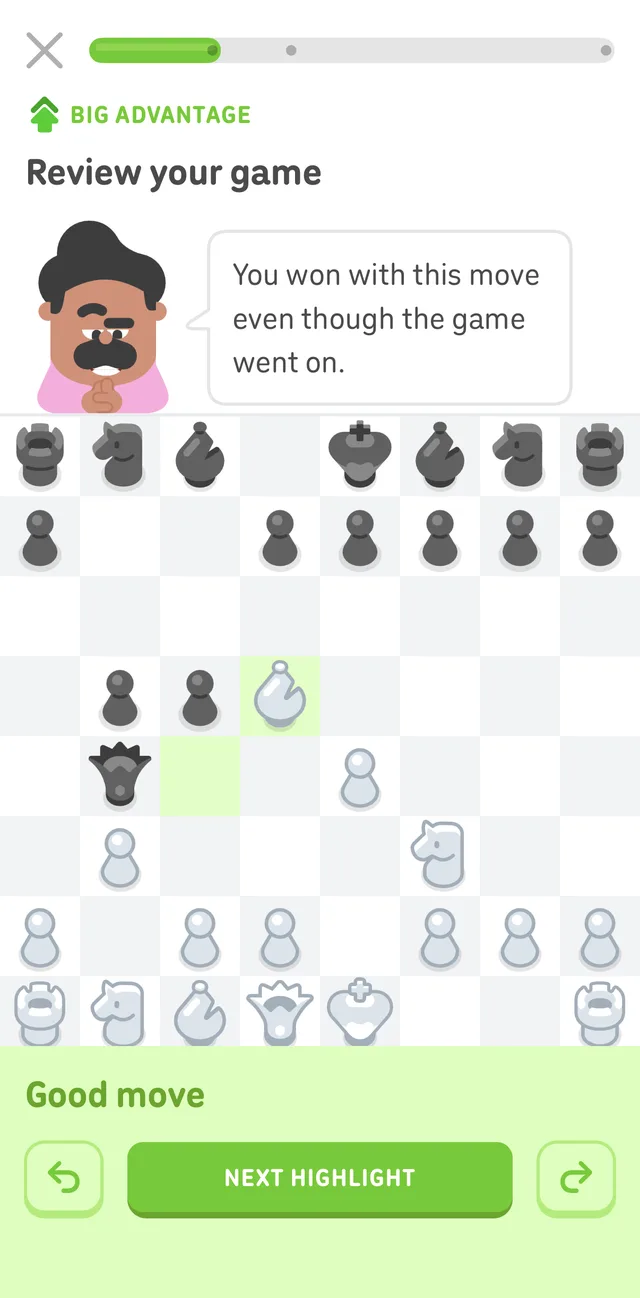
One of the three highlight cards from a match we played and reviewed on 3 September 2026. Note the three-dot progress bar, the "Big Advantage" tag rather than a number, and the undo and redo arrows either side of "Next Highlight."
We played a full match and opened Game Review the moment it finished, to see what actually ships rather than what the announcement describes in the abstract. The progress bar at the top carries exactly three dots, and that count does not flex: the review surfaces three highlighted moments per game, not one for every meaningful decision. In the win we captured, all three highlights carried the same verdict, "Good move," each with a short caption from Oscar in plain language ("You won with this move even though the game went on," "Checkmate! What a spotless finish to a clean game.") and a category tag such as "Big Advantage" next to a direction arrow. That tag is a rough direction and size, not a number: there is no centipawn score anywhere on the screen, no move list, no view of what the opponent actually played on the moves in between, and no accuracy percentage. Inside a highlight, the two round arrow buttons only step you between those three cards; there is no way to scrub through the rest of the game move by move.
Finishing the review paid 10 XP, on top of 30 XP already earned for playing the match itself. The post-match screen framed reviewing as a habit rather than an afterthought: "Now review it! Learners who review wins increase Elo 2.4x faster." The loading screen the review builds behind makes the same claim with slightly different wording: "Chess learners who review their games improve Elo 2.4x faster." Two phrasings of the same statistic, on two different screens, and neither one is sourced on screen or in the announcement post itself.
Match history keeps every completed game with its own "Review" link, so this walkthrough is repeatable game to game rather than a one-time launch flourish.
The platform situation
At launch on 11 August 2026, Duolingo's own wording was unambiguous: Game Review was available on iOS, with Android described as "coming soon" and no date given. That was still the wording as of our check on 27 August 2026. Checked again on 4 September 2026, the same announcement page now reads "Game Review is available now on iOS and Android." Duolingo has not published the specific date Android caught up, and the change happened sometime in the roughly three weeks between our two checks.
This does not change how long the feature has existed on Android overall: Duolingo Chess itself has been on Android since September 2025, well before Game Review shipped on either platform. If you are on Android and still do not see a review prompt after a match, update the app rather than look for a separate setting.
Where Game Review stops
Game Review is a highlight reel, and a well-made one. It is not an engine report, and the difference matters once you are past your first few hundred games.
A highlight reel picks moments. An engine report evaluates every move in the game, tells you how much each error actually cost, and shows you the line you should have played instead. Those are different products for different stages of learning.
| Question you have after a loss | Highlight reel | Engine report |
|---|---|---|
| Which moves were the turning points? | Yes | Yes |
| How much did that mistake actually cost? | No | Yes, as an evaluation swing |
| What should I have played instead? | Rarely | Yes, with the follow-up line |
| Was that mistake realistically findable at my level? | No | Only if the tool models human play |
| Why was it a mistake, in words? | Short label | Depends on the tool |
That fourth row is the one almost nothing addresses. A strong engine will happily tell a 900-rated player that they missed a quiet retreat that sets up a knight fork in four moves. Technically true, practically useless: no one at that level was going to find it, and being told about it teaches nothing except that engines are strong.
The question worth asking about any review feature
When you look at a mistake in your own game, you want three things in order:
- Was this actually the moment the game turned? Not the flashiest moment, the decisive one.
- Would a player at my level have found the better move? If yes, it is a real lesson. If no, it is trivia.
- Why is the better move better, in plain language? Not a symbol, not a number. A sentence you could repeat to someone else.
Duolingo's Game Review answers the first one well and gives a short answer to the third. The second one requires modelling how humans at a given rating actually play, which is a genuinely hard problem and not what Duolingo is trying to solve.
What to use if you want more than a highlight reel
Platform is no longer the reason to look elsewhere; depth is. If you want a full engine pass on every game rather than three picked highlights, here are the options, on either platform.
Lichess is free and gives away more analysis than anyone: an unlimited live board and Opening Explorer, plus a deep Stockfish report capped at 40 games a day, the same cap for Patrons. For anyone playing fewer than 40 games a day that cap is not a real constraint, and it costs nothing either way. What it will not do is explain anything in words, or judge whether a move was findable at your level. You get evaluation numbers and best lines, and you interpret them yourself. See our full Lichess analysis breakdown for the details.
Chess.com's Game Review gives you one free review per day, with unlimited reviews on the paid tiers. The free daily cap is the constraint if you play more than one game a day, which most people do.
Chessdrive is what we make, so treat this as the interested party talking. It reviews your games on both iOS and Android, runs Stockfish for the evaluation and an on-device Maia3 model for the human-likelihood question, and the coach explains each mistake in your own language rather than assigning it a label. That last part is the reason it exists: a review that says "inaccuracy" teaches you nothing, and a review in a language you only half read teaches you less than that.
The honest summary
Duolingo shipping Game Review is good news for chess generally. The single biggest reason beginners plateau is that they play hundreds of games and never look at one of them again, and Duolingo is unusually good at turning a habit into a streak. Attaching XP to reviewing is a smarter piece of product design than most chess apps have managed.
If you are just starting out, on either platform now, use it. It will catch your hanging pieces and it will show you the counterattacks you kept missing.
If you are past the hanging-pieces stage and want to know what an error actually cost and whether you could realistically have found the alternative, you want a full engine report with human-likelihood modelling on top, and that is a different category of tool than a three-highlight reel.
Update log
- 4 September 2026: Corrected the platform status: Duolingo's own announcement now reads "available now on iOS and Android," a change from the "coming soon" wording at launch and as of our 27 August check. Added a first-hand walkthrough of a captured review screen, including the fixed three-highlight structure, the exact XP rewards, and the two different phrasings Duolingo uses for its "2.4x faster" claim.
Last verified 4 September 2026 against Duolingo's announcement and a first-hand match played for this article.
Frequently asked
- Does Duolingo Chess have game analysis?
- Yes, since 11 August 2026. Before that date it had no post-game analysis at all, which is why older articles and forum answers say the opposite. Anything written before mid-August 2026 is out of date on this point.
- Is Duolingo Chess Game Review available on Android?
- Yes, as of our most recent check on 4 September 2026, when Duolingo's own announcement read "Game Review is available now on iOS and Android." That is a change: at launch on 11 August 2026 the same page said Android was "coming soon," with no date given, and it still said that as of our previous check on 27 August 2026. Duolingo has not published the exact date Android caught up.
- Does Game Review cost anything?
- Duolingo Chess is part of the free Duolingo app and there is no chess-specific paywall on the review feature. Reviewing a game also earns XP, so it counts toward your daily goal.
- Is Duolingo's Game Review enough to improve my rating?
- It is a good habit-former and it will catch the obvious drops. It is not an engine report: it surfaces selected moments rather than evaluating every move, so it will not tell you the size of an error in centipawns or show you the alternative lines you could have played.
Want more than three highlights per game?
Chessdrive reviews every move of every game you play or import, on iOS and Android, and the coach explains each mistake in your own language rather than labelling it and moving on.
Keep reading
Updated